
Keep ComputerEase right where it is. Get cloud reporting anyway.
You bought ComputerEase to run in your own office — and it still does the job. The Data Bridge is a small piece of software we install next to it. Every night, it copies the numbers you choose — job costs, receivables, crew hours — into live dashboards you can open anywhere. Your books stay home. Your reporting finally catches up.
Illustrative preview — real customer screens below.
You're not behind. You're holding your ground.
You own it. It works.
Your ComputerEase is paid for, stable, and holding years of job history. It does construction accounting as well as it ever did. Nobody should have to abandon that just to get a dashboard.
The cloud pitch keeps coming.
Modern reporting lives in the cloud, and the standard answer is "migrate the whole system." A big check, new subscriptions, a retraining project — all to answer "how are my jobs doing?"
There's a third option.
Bridge the reporting out. Keep the books home. ComputerEase stays exactly as it is, where it is — and your numbers are waiting in a dashboard every morning.
Staying off the cloud isn't stubbornness — it looks smarter every year. Your bids, costs and margins are competitive information. With the Bridge your system of record never leaves your server; only the report numbers you picked travel, one way, encrypted. And we publish exactly what else moves, down to the line.
Monday's questions, answered on Monday.
Not at month-end. Not after someone spends a morning rebuilding a spreadsheet. These are the three views contractors put up first.
A job's real cost, while you can still act on it.
Budget vs. actual by cost code, organized the way your PMs already think about jobs, current as of last night. Overruns surface while the job is still running — not in the closeout meeting.
Receivables you can work this morning.
Who owes what, in aging buckets, as of today. The collection call happens while the invoice is young and the customer still remembers the work.

The shop on a wall. The owner on a phone.
Dashboards readable from across the floor — and the same numbers in your pocket when you're nowhere near the office.
Three steps. None of them yours.
A small program goes in one folder on your ComputerEase server. Nothing changes inside ComputerEase — it keeps doing the accounting.
Each night it reads the numbers you chose — read-only — and shapes them into report form. Your raw books never leave the building.
you picked
By morning your dashboards are current — on a laptop, a phone, or a screen on the shop wall.
FootprintNo VPN. No new hardware. Nothing for your team to run or remember. If your IT folks can approve one folder and one scheduled task, you can have this.
Standing this up used to be a project. Now it's a sitting.
Connecting a bridge to an ERP used to be a bespoke engineering job every time. We built that work into a guided tool, and this is what actually happens when we run it with you — on one call, on your server. You don't run it. We do. It's here because it's why onboarding takes weeks instead of quarters, and why changing your mind about a report later isn't a change order.
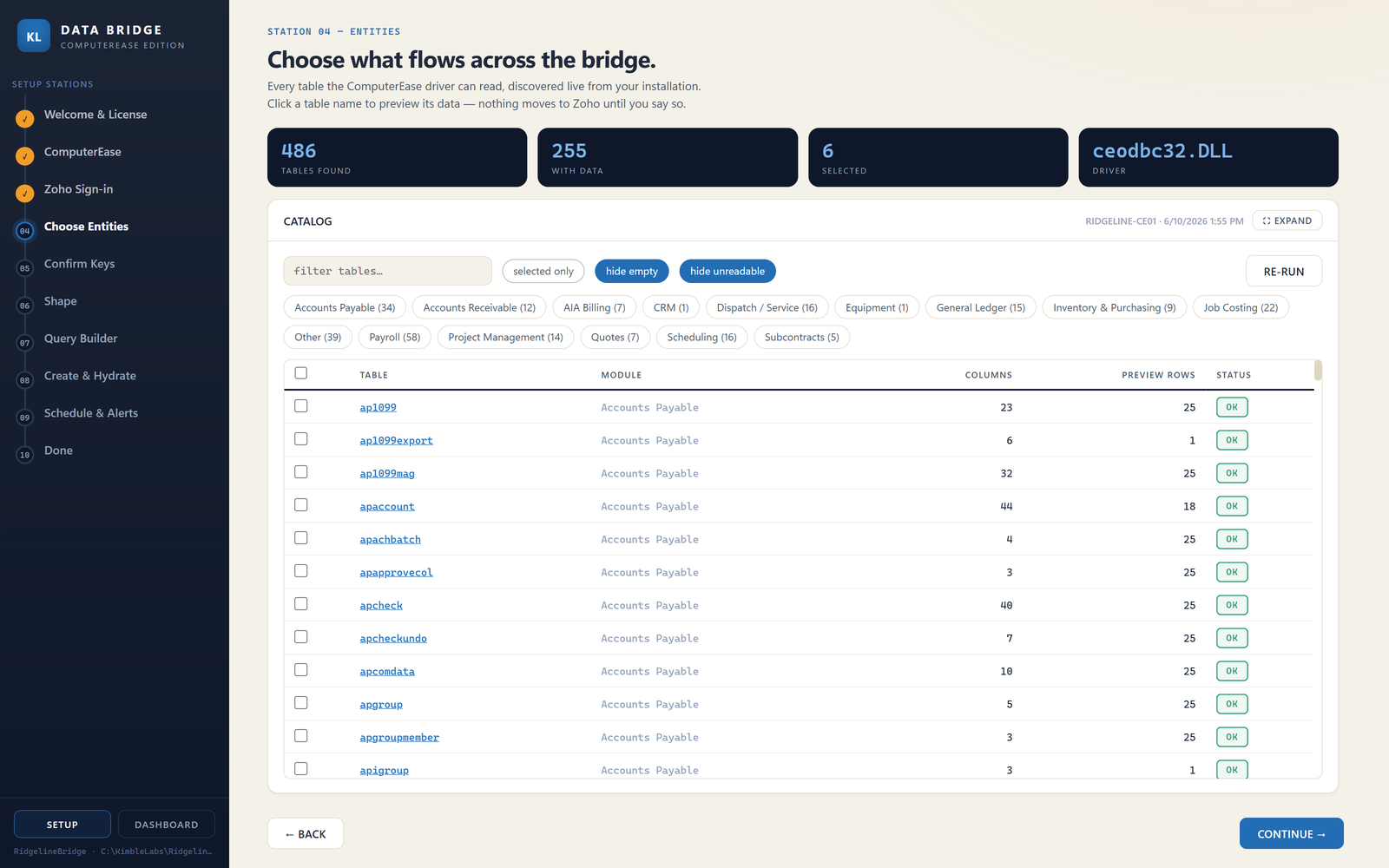
It reads everything you have.
486 tables in this installation — 255 of them actually holding data. The tool finds them all through Deltek's own driver, groups them by module, and tells you which ones are readable. Nothing moves anywhere until you pick.
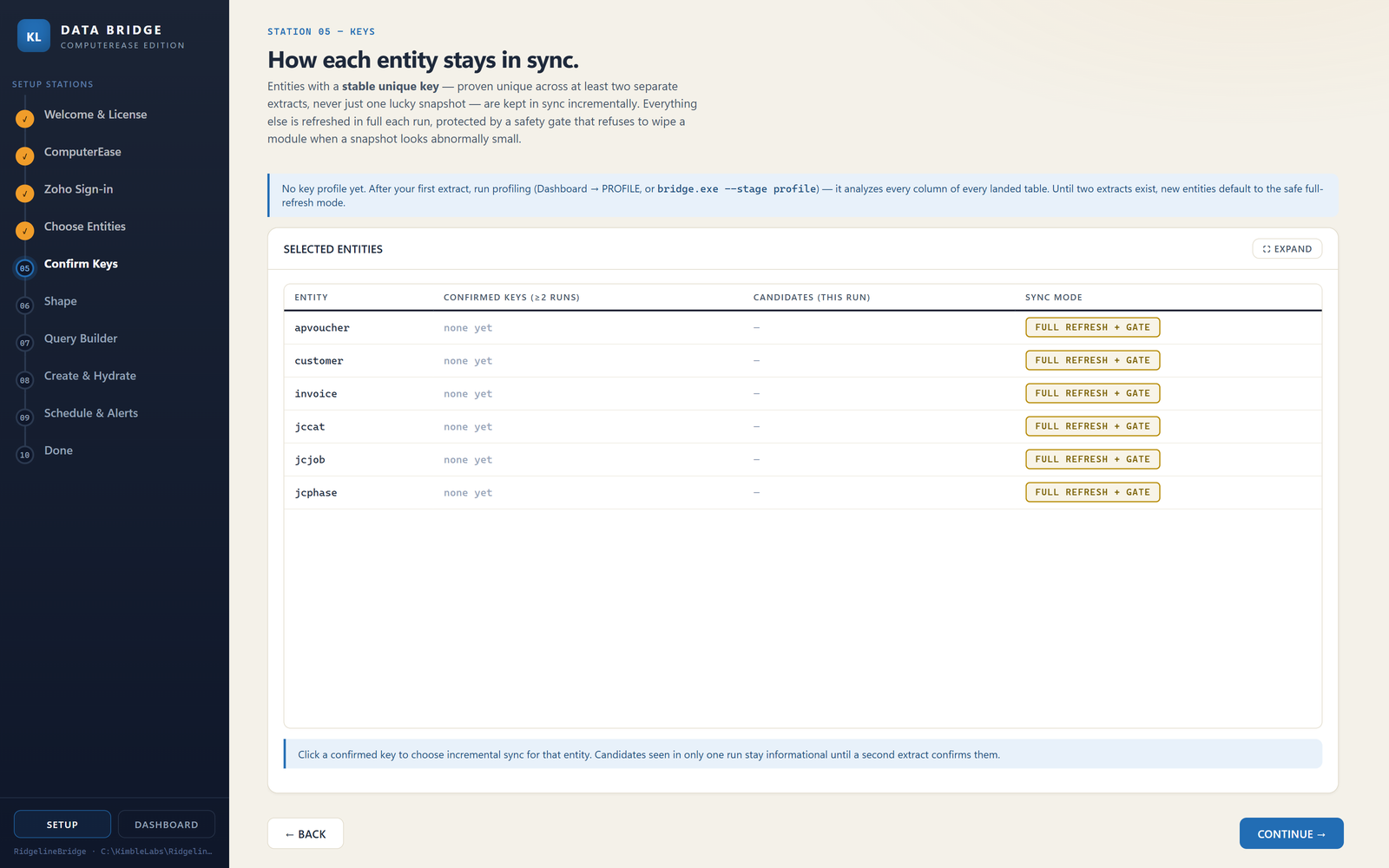
It works out how records stay matched.
Before anything syncs incrementally, a key has to prove itself unique across two separate extracts — never one lucky snapshot. Until it does, that table stays on full refresh behind a safety gate that refuses to load a night's numbers when they look abnormally small.
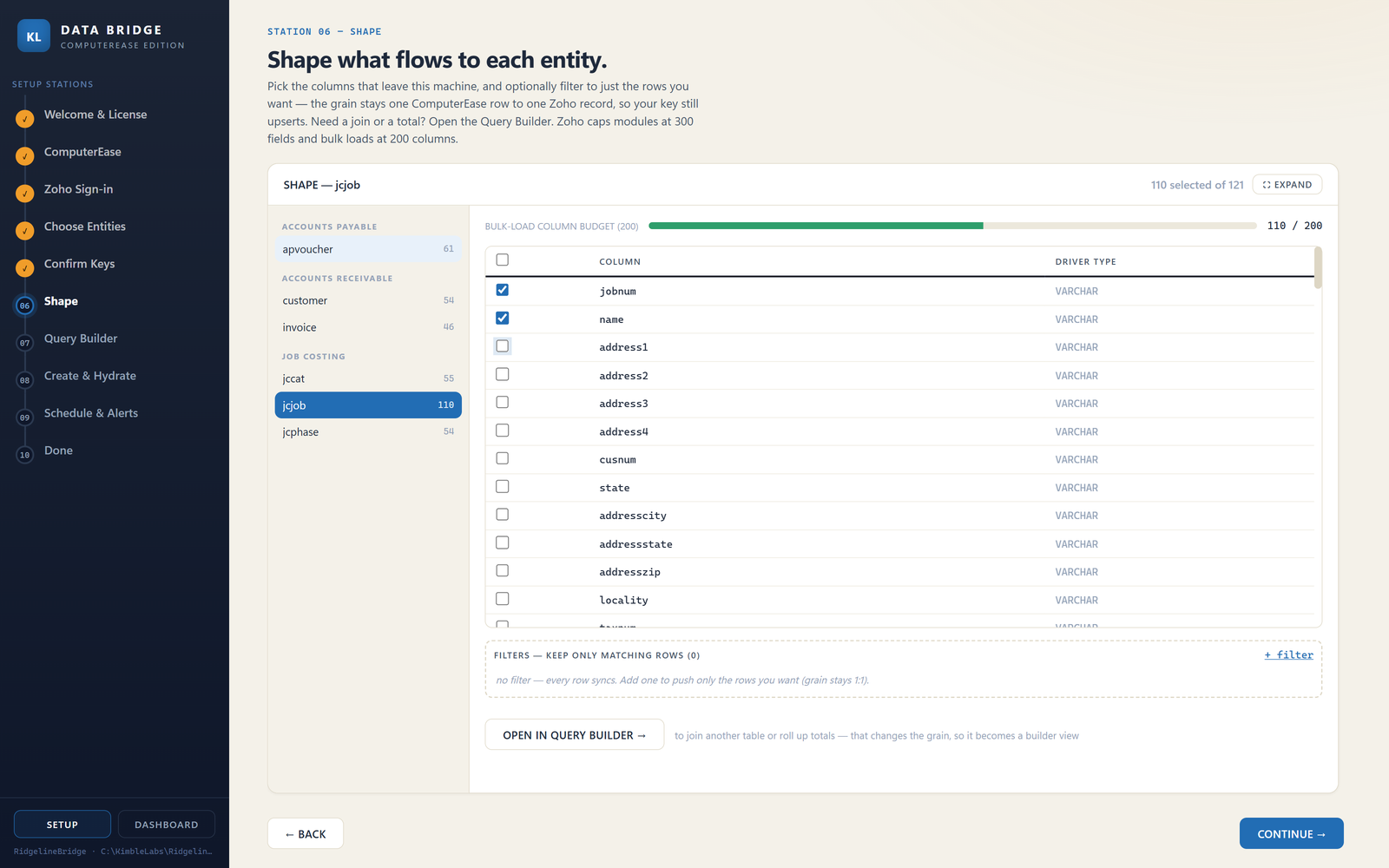
You choose exactly what leaves.
Column by column. This job table carries 121 columns; 110 were kept. The meter tracks the platform's 200-column load ceiling so a sync can't fail for being too wide. This screen is also the plain answer to "what exactly are you sending?" — it's this list, and nothing else.
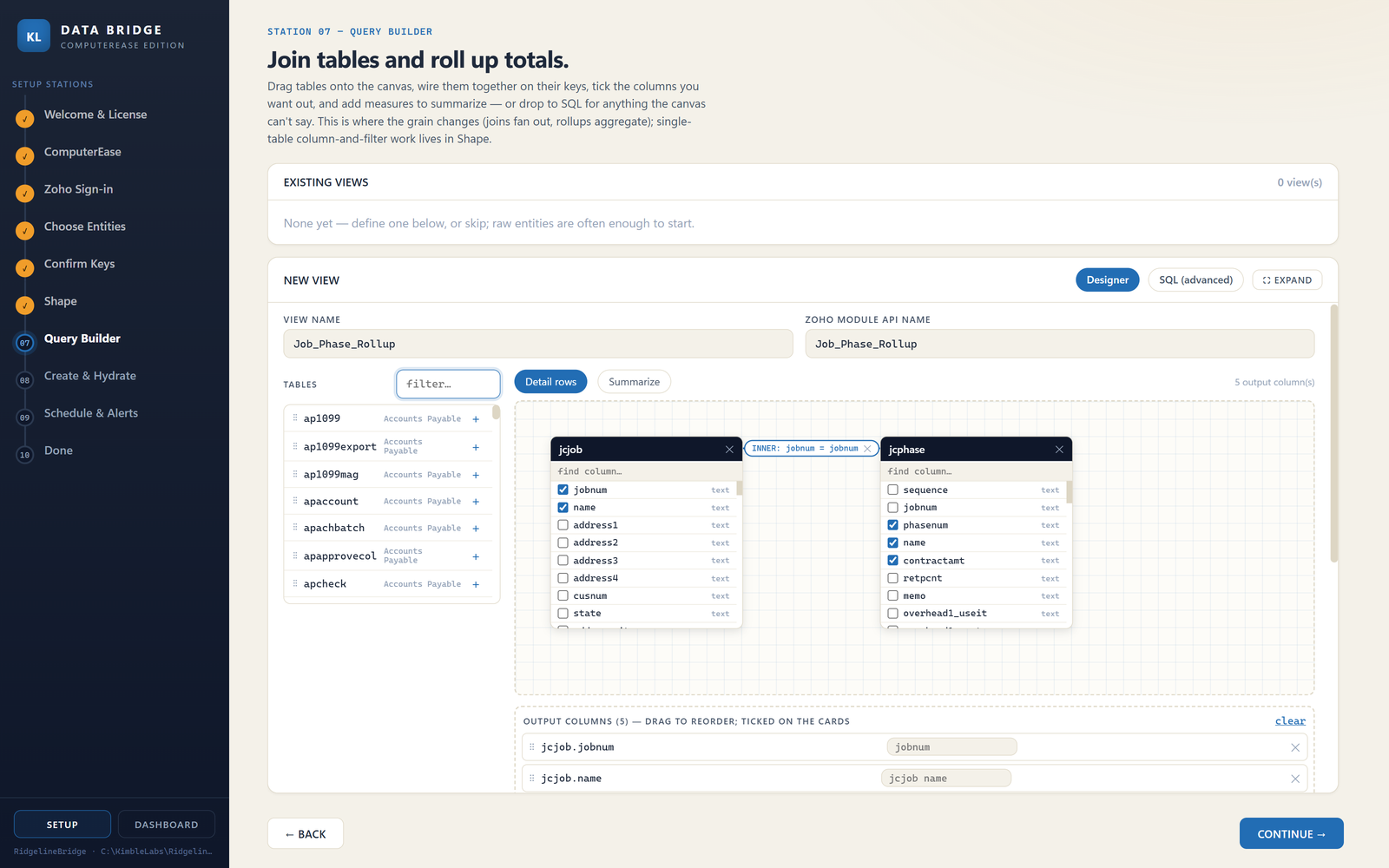
Reports get wired together, not coded.
Drag the tables you need onto the canvas, connect them on their keys, tick the columns you want out. Here a job table is joined to its phases to build a cost rollup. When your reporting question changes — and it will — this is a five-minute change, not a change order.
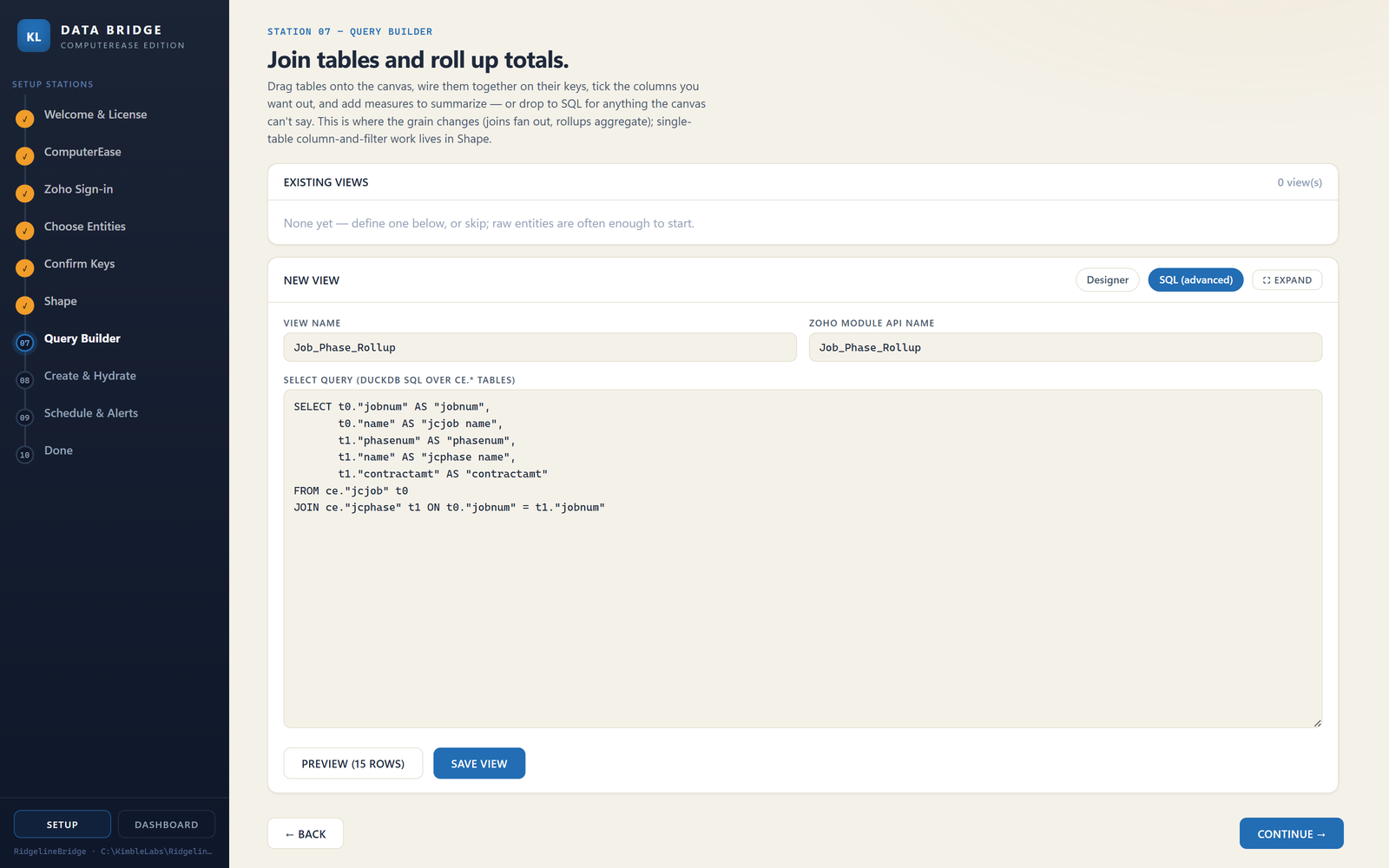
And it's real SQL underneath.
Everything the canvas builds compiles to readable SQL you can inspect — and drop straight into when the canvas can't say what you mean. None of this is a black box, which is the answer your IT advisor is actually looking for.
Install & connect
One folder on the server. Together we pick the numbers that matter.
First dashboards
Your views take shape — we review them with you and adjust.
The parallel run
Your old reports vs. the Bridge — same data, every number compared.
Cutover & watch
Dashboards go live. The morning watch begins, and never stops.
Two good answers. We'll help you pick.
The Bridge moves the numbers. The dashboards need a home — and there are two, depending on how much platform you want to own.
On Zoho
Dashboards live in a Zoho environment in your company's name. You own it outright — and it can grow into CRM, quoting, and service workflows whenever you're ready.
- A full dashboard & reporting platform — Zoho Analytics
- Yours: your licenses, your data, your logins
- Grows into CRM and operations if you want it to
- We stand the whole thing up during onboarding
On SEWP
Dashboards live on SEWP, the analytics portal KimbleLabs built and has operated for over a decade. Your numbers land in your own isolated database, behind your own branded login — consistent with everything this page promises about keeping your data yours. Nothing to license, nothing to administer. You get logins, and you start looking.
- Your own isolated database — never a shared pool
- Live reports you can re-arrange, drill, and save
- Excel exports that open as real PivotTables — not CSV dumps
- Lower per-seat cost than owning a full platform
Not sure which? That's literally what the walkthrough is for — we'll look at what you have and recommend one. And switching later is fine; the Bridge doesn't care where it delivers.
It runs by itself. It's still never alone.
Software that runs unattended next to your books has one job above all others: never fail silently. That's what the monthly fee actually buys.
At one contractor, an IT vendor moved the accounting system to a new server. The weekly hand-built reporting routine didn't throw an error — it simply stopped. Dashboards froze for weeks, until an executive asked why the numbers hadn't moved. Nothing logged it. Nothing alerted anyone. Nobody owned it.
We see every run
The Bridge reports in every morning. A missed run is a same-day conversation — not a surprise weeks later.
Bad data gets stopped, not loaded
If a night's numbers look wrong — far fewer rows than usual, say — the Bridge refuses to load them rather than blank your dashboards, and tells us why.
It survives your IT vendor
Server moved? Driver updated? The Bridge tells us exactly what changed. That's usually the night a hand-built process dies quietly — it's the night this one proves itself.
You hear from us, with the fix
Alerts page us, not you. Most issues are handled before anyone at your company knew there was one.
- 03:00 Read 13 tables · 3.8M rows OK
- 03:26 Shape 5 report sets OK
- 03:27 Check row counts within range PASS
- 03:28 Deliver dashboards fresh OK
The Bridge's actual nightly report card — what we read every morning so you don't have to.
The part to forward to your IT vendor.
Everything they'll ask, in one place. We'd rather take their questions before install day than after.
- Footprint
- One folder on the ComputerEase server. One scheduled task. No services exposed, no agents on other machines.
- Network
- Outbound HTTPS (TLS 1.2+) on port 443 only. No VPN. No inbound ports. No remote access of any kind.
- Data residency
- The full ERP dataset is read and staged on your own machine. The only payload delivered off-premises is the set of transformed reporting rows you selected — tables and columns are chosen in a picker and approved before the first run.
- Telemetry to KimbleLabs
- Each run reports its health to us: row counts, stage durations, pass/fail. That is how a missed or refused run becomes a same-day conversation. When a load fails, the diagnostic we receive can include a sample of the rejected records — that is what lets us fix it without asking you to reproduce anything. Nothing else is transmitted, and we never warehouse your data. Full breakdown: what leaves, line by line.
- ComputerEase impact
- Read-only access through the vendor's own ODBC driver, scheduled off-hours. Nothing inside ComputerEase is modified, ever.
- Publisher
- Releases ship signed under KimbleLabs LLC's Microsoft-issued publisher certificate, with RFC-3161 trusted timestamps. Microsoft completed our organization identity validation in July 2026 — the certificate chains to Microsoft's Identity Verification Root, so Windows verifies the publisher and the integrity of the binary on every endpoint, every time it runs.
- Credentials
- Encrypted at rest with Windows DPAPI, bound to the machine. No plaintext secrets — not in config files, not in logs, not anywhere.
- Observability
- Daily logs, a per-run statistics ledger, webhook alerting, and bounded retries that distinguish transient faults from configuration changes.
Questions from your IT vendor are welcome — seriously. Put them on the walkthrough call.
What leaves your building. Line by line.
Most vendors answer this with a slogan. You're about to let software sit next to your general ledger, so you deserve the actual inventory — including the parts that are less tidy than a slogan.
- Stays Your ComputerEase data
- Read in place, read-only, on your own server. The full dataset is never copied off the premises — not to us, not to a middleware cloud, not anywhere.
- Stays The working copy
- The Bridge stages and shapes data in a local database file on your machine. It never leaves, and you can delete it — the next run rebuilds it.
- Stays Credentials
- Your ComputerEase login and your dashboard-platform tokens are encrypted with Windows DPAPI and bound to that machine. They are not transmitted and not recoverable off that box.
- Stays Logs
- Daily run logs are written to disk on your server, where your IT vendor can read them any time.
- Leaves The reporting rows you selected
- Destination: your dashboards — your own Zoho environment, or SEWP. The tables and columns are chosen in a picker during onboarding and approved before the first run. Encrypted in transit, outbound only, on your schedule.
- Leaves Run health
- Destination: KimbleLabs — row counts, stage durations, pass/fail, timestamps. This is the feed that makes a missed or refused run a same-day conversation instead of a discovery six weeks later. It carries no field values.
- Leaves Failure diagnostics
- Destination: KimbleLabs — when your dashboard platform rejects a load, the error it hands back can include a sample of the specific records it refused, and that diagnostic reaches us in the alert. It is how a failure gets fixed without asking your controller to reproduce anything. It is also the one place where record-level content can travel, so we are naming it rather than letting your IT vendor find it.
This table is the whole inventory. If anything else on this page reads broader than what's written here, this table is the one that's true — tell us and we'll fix the page.
Sized to your shop, not to enterprise budgets.
Tiers follow your ComputerEase seat count — a fair stand-in for how much data the Bridge carries and how many people lean on it. Every tier includes install, nightly delivery, monitoring, alerting, and a human who answers.
- The core numbers — up to six data sets
- One dashboard pack
- Refreshed nightly
- Standard response
- Everything worth seeing — full data catalog
- Full dashboard pack — job cost, AR, labor, WIP
- Nightly refresh + dashboard upkeep
- Priority response
- Multi-company / multi-shop
- Custom views & report logic
- Up to twice-daily refresh
- Priority SLA + quarterly review
Onboarding is scoped, not metered — the number moves with how many data sets you want, custom report logic, and the state of the data. It always includes the parallel-run validation and your dashboards, built. And if we think you don't need the Bridge, we'll tell you that too.
Asked early, and often.
Is this a first step toward making us migrate off ComputerEase?
The opposite. The Bridge exists so you don't have to. ComputerEase stays on your server, unchanged, for as long as it serves you — the Bridge just gives it the reporting it never shipped with. If you ever do move systems, the dashboards come with you. That's your call, on your timeline.
Will this slow down or change ComputerEase?
No. The Bridge reads off-hours, read-only, through the access method Deltek itself provides. Nothing inside ComputerEase is modified — it keeps doing the accounting exactly as before. Your team won't notice it exists, except that the dashboards are suddenly current.
We don't run Zoho — do we have to?
No. Your dashboards can live in two places: your own Zoho platform (we set the whole thing up during onboarding, and you own it), or on SEWP — the reporting portal KimbleLabs has built and operated since 2014, where your numbers get their own isolated database and there's nothing for you to license or administer at all. We'll recommend one in the walkthrough based on what you have and where you're headed.
We're on ComputerEase Cloud (hosted). Does the Bridge work?
Usually — it depends on which kind of hosting you're on, and we check before you commit to anything. If your ComputerEase runs on a dedicated hosted server (your own instance, the common arrangement), the Bridge works: it uses Deltek's read-only data access, which is a Deltek line item on your account. If you're on a shared multi-tenant setup, that data access isn't available and the Bridge can't reach your data — we'll tell you that on the walkthrough rather than after a contract. Checking takes one question to your Deltek rep, and we're happy to be on that call.
Where does our data live?
Your books stay where they already are. The Bridge reads and stages on your own machine, and the only payload that reaches your dashboards is the set of report numbers you picked. Two other things travel — run health, and failure diagnostics — and rather than summarize them we've published the whole inventory, line by line. We never warehouse your data.
What happens when something breaks?
The Bridge notices first. It logs it, alerts us, retries transient faults, and refuses to load a night's numbers if they look wrong — so a glitch can't quietly blank your dashboards. You hear it from us, usually with the fix already underway.
Who owns what?
Your data is yours, full stop. If your dashboards live in your own Zoho, you own that platform too. The Bridge software and its report logic are licensed as part of the service — that's what lets us maintain and improve it for every client at once.
Are you affiliated with Deltek?
No. KimbleLabs is an independent firm. We built the Bridge because our clients run ComputerEase and needed to see their numbers — not because anyone in the ERP business asked us to.
ComputerEase is a registered trademark of Deltek, Inc. KimbleLabs is an independent firm and is not affiliated with, sponsored by, or endorsed by Deltek. Product names are used to identify compatibility only.
The hard part was never ComputerEase.
Reading an on-prem database on a schedule, proving the numbers match before anyone sees them, and watching it every morning — that's the engine, and none of it is specific to one ERP. What is specific is knowing your system's quirks and what your industry's reports need to say. This edition is the one we've built and run in production.
So if your books live in a different on-prem system and the reporting problem sounds familiar — tell us what you're running. We'll give you a straight answer about whether we can reach it, including "not yet." We're deciding which system to take on next, and the people asking are how we choose.
Fifteen minutes. Your numbers.
A walkthrough with the practitioner who built the Bridge — not a sales team. Bring your reporting wishlist; we'll show you what's possible and tell you straight if the Bridge isn't the fit. ComputerEase stays right where it is either way.